
Report Subscriptions allow users to schedule reports to be delivered automatically. Use the Subscriptions page to manage all scheduled report deliveries for your organisation. Two report types are currently available: Utilisation Report and Timesheet Reminder. Administrators can register staff members to receive either report on nominated days and times. Currently two report types are available: Utilisation Report (sent on a schedule to help managers track team utilisation) and Timesheet Reminder (sent to remind staff to submit their timesheets). Administrators can register staff members to receive either report on nominated days and times.
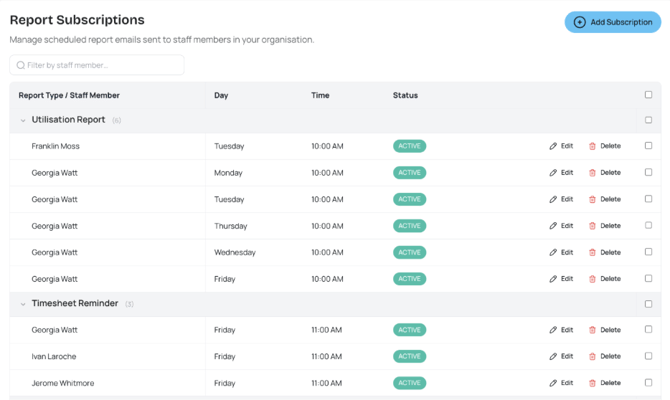
Figure: Report Subscriptions page showing registered subscriptions for utilisation and timesheet reminder reports.
Set up a report subscription
-
Navigate to the Subscriptions page and click Add Subscription.
-
Select the report type, frequency, and delivery day/time. If the same report is already scheduled for the same day and time, Ponyrider will display a warning to prevent duplicates.
-
Click Save to activate the subscription. The report will be delivered automatically on your chosen schedule.
Manage subscriptions
-
Bulk delete: Select multiple subscriptions using the checkboxes and click Delete to remove them all at once.
-
Duplicate check: Ponyrider warns you if a report is already scheduled for the same day and time before you save, preventing accidental duplicates.
Next: Geographical Variations