
Utilisation is half of the equation the other half is Revenue. Ponyrider automates this by linking project timelines to your financial settings:
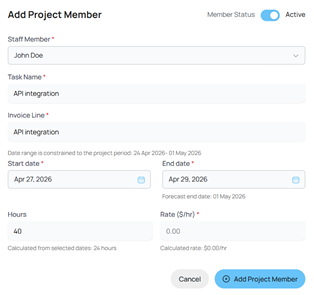
- Time Distribution: When assigning a resource to the project, Ponyrider auto-calculates hours between the Start and End dates of a project.
- Validation: If there is a mismatch between assigned hours and the project duration (accounting for holidays), Ponyrider will prompt you to double-check the data before proceeding.
- Example (as seen below): If the selected window is April 27–29 (24 working hours) but the user inputs 40 hours, Ponyrider gives a heads-up that the Forecast End Date should be May 01 to accommodate the workload.
- Revenue Calculation: The system identifies the Rate ($/hr) by referencing the Rate Card assigned for a specific client and role associated to the staff member.
-
-
- Tip: If the pre-populated rate differs from your expectations, it serves as a prompt to double-check and update your Rate Cards or the user’s Departmental Role.
-
The Result: Getting the Setup Right
By ensuring accuracy at the point of entry, Ponyrider generates two critical business metrics that can be tracked via the Dashboard:
- Revenue Forecasting: Based on assigned hours and role-based rates, the system projects the total expected income for the entire life of the project.
- Margin Forecasting: By comparing revenue forecasts against resource costs, the system calculates the Forecast Margin, providing an immediate view of project profitability.
Next: Dashboard