
The Projects dashboard provides a high-level organisation financial health sorted by project. It allows leadership to see exactly how project performance impacts the bottom line by comparing initial projections against real-time data.
Access Level: Restricted to Primary Admin and Admin roles.
High-level KPI tiles:
- Total Projects: Count of all active projects within the organisation.
- Forecast Margin: The cumulative expected profitability percentage across the entire project portfolio.
- Revenue Forecast: The total projected income based on active projects scopes and quotes.
Note: You can drill down into any of these metrics by clicking on the respective tile.
Total Projects
Selecting Total Projects brings a table-view of Client, Project, and their respective Start/End Date, and count of Timesheets to Approve. This view highlights Timesheets to Approve, ensuring no billable hours are missed in your revenue calculation.
Forecast Margin
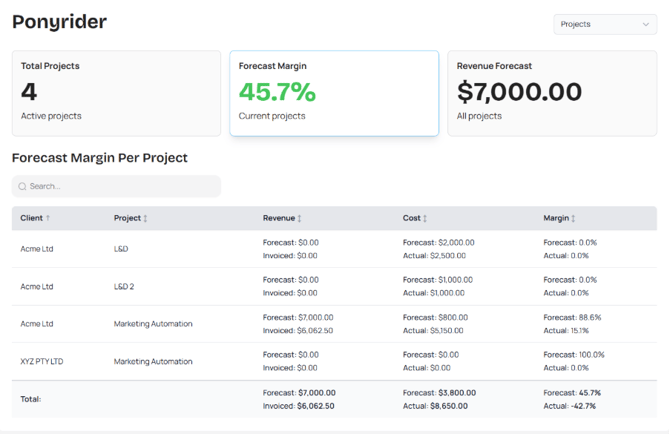
Selecting the Forecast Margin brings forward a granular breakdown of project-specific financials, allowing you to track profitability at project level:
- Revenue (Forecast vs. Invoiced): Tracks your "Billing Gap." See the total value planned for the project versus what has been invoiced.
- Cost (Forecast vs. Actual): Monitors your "Spend Health." This compares the initial estimated costs against the actual costs incurred (time logged and expenses), highlighting potential budget overruns.
- Margin (Forecast vs. Actual): A direct comparison of projected profitability versus current reality.
- Forecast Margin: Your target profit based on the initial quote.
- Actual Margin: Real time profitability based on current costs and invoiced totals.
- The Total Row: The bottom row aggregates all data, providing a snapshot of the organization's total variance between forecasted targets and actual performance.
- Tip: Use the Search bar to quickly isolate specific clients to review their account profitability during quarterly reviews.
Revenue Forecast
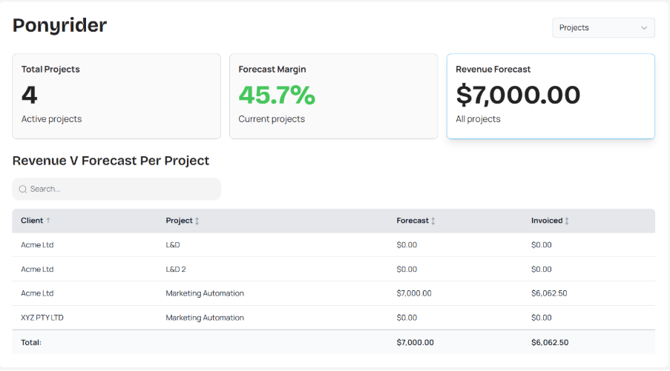
Selecting the Revenue Forecast brings forward a granular breakdown of revenue vs. forecast per project. This allows you to see which projects are not yet Invoiced and follow through to the respective client(s).
Next: Finance