
This is the personal hub for every team member. It provides individual-level visibility into your own workload, time-tracking health, and the timesheet submissions you need to catchup on.
Access Level: Available to all users.
Personal KPIs
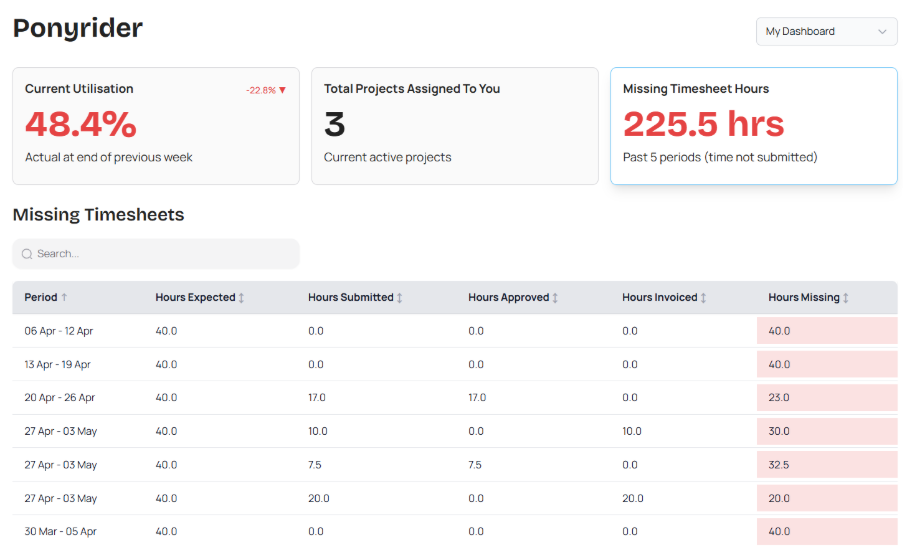
Selecting each tile brings forward the specific details required to manage your administrative health:
- Current Utilisation: Shows your actual billable performance as a percentage of your total capacity at the end of the previous week.
- Total Projects Assigned To You: A real-time count of all active projects where you are a primary team member.
- Missing Timesheet Hours: This displays the total number of hours not yet submitted for the past five periods. Use this to ensure your work is captured for billing and project tracking.
Utilisation Against Target
This visual trend report allows you to bridge the gap between completed work and upcoming assignments.
- Timeline line (Vertical Blue): Separates historical actual time from forecasted work.
- Actual (Green): Represents the actual time logged.
- Forecast (Blue): Projects future workload based on currently assigned project hours.
- Billable (Red): Isolates the specific portion of logged time that is chargeable to clients.
- Target (Grey): The horizontal benchmark representing the organisation's goal for healthy utilisation.
My Projects
The dashboard provides a granular view of your active engagements:
- Monitor your Start and End Dates to stay on top of deadlines.
- Compare Hours Assigned against Hours Booked to see how much of your allocated time remains.
- Hours highlighted in red (e.g., "10 over") indicate where a project has exceeded its initial hour allocation.
- Easily identify the assigned Project Manager for each engagement to streamline communication regarding budget adjustments or timeline shifts.
Missing Timesheet Hours
This dashboard view highlights the gaps in your time logging from previous periods, ensuring that your project data remains accurate.
- View which weeks require attention based on the date range.
- View your required capacity (e.g., 40.0 hours) alongside what has been recorded.
- Track the lifecycle of your time through Approved and Invoiced columns to see if your missing hours are holding up the billing cycle.
- Any remaining balance is highlighted in red in the Hours Missing. This serves as a direct indicator to catch up on your administrative workloads.
Tip: Use this view at the end of each month to "clear the red" before the final financial reports are generated for the organisation.
Next: Stopwatch